 PremisePulse
We do not sell your personal information. Read our Privacy Policy
Friends & Family Test
Know the pulse of your property.
Upload a photo and get clear AI-assisted guidance about possible visible property issues, urgency, and what to do next.
Find local repair help — no paid placementAn early version for invited friends and family. Create your own account, try a scan, and send feedback. Free during this test; no payment details needed.
Photo + result examples
See what a result can look like.
Choose a photo to see matching illustrative guidance.
Roof damage
Severity: High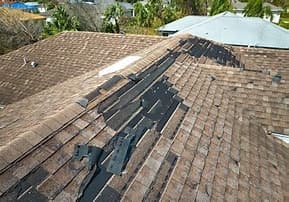
Visible observation
Several shingles appear lifted, displaced, or missing along a long strip beside the ridge, leaving dark underlying material visible.
Confidence
Medium
Professional
Roofer
Can it wait?
Prompt attention recommended. The damaged roof covering may allow water entry; a leak or hidden structural damage cannot be confirmed from this photo.
Recommended next step
Arrange a prompt inspection by a qualified roofer to assess the damaged covering and any needed weather protection. Stay off the roof.
Illustrative example, not a live scan or professional inspection. A photo cannot confirm that a property is problem-free or reveal hidden damage.
How It Works
From photo to clear next steps.
PremisePulse is designed to make property questions easier to understand without requiring technical knowledge.
Upload a Photo
Take a photo of a roof, crack, water stain, driveway, electrical panel, HVAC system, or another property concern.
AI-Assisted Analysis
PremisePulse reviews the image for possible visible issues and evaluates severity, confidence, and likely repair considerations.
Know What to Do Next
Get understandable guidance about urgency, next steps, and the type of professional to contact when needed.
Choose Repair Help Quickly
Enter your property ZIP or postal code before scanning. Matching company cards appear automatically with your result where we have reviewed coverage, so you can choose a company and tap to call without starting another search.
Cards show reviewed BBB accreditation and letter ratings, plus emergency-service information where checked. Current candidates cover roofing and plumbing near ZIP 78220. Other locations receive a prepared BBB search link.
Companies cannot pay for inclusion or higher placement.
Current accreditation, service at your property, and immediate availability need confirmation. Possible danger notices include an optional Call 911 button for urgent results.
Property Passport
Keep your property scans together.
Save photos and AI observations to your account, group scans by property, and revisit them whenever you need.
AI Scan History
Revisit saved photos, findings, and suggested next steps.
Property Groups
Name your properties and keep their scans organized.
Private to Your Account
Sign in to view your saved photos and results.
Manage Saved Scans
Move scans to the right property or delete ones you no longer need.
Example Property Passport
My Home

Roof Scan
October 2026
HVAC Scan
August 2026
Water Stain Scan
July 2026
Driveway Scan
May 2026
Testing & Feedback
Help shape what comes next.
This early version is for invited friends and family to try and share feedback. No paid plans or checkout are available during this test.
Try the working features
- Create your own account and confirm your email.
- Upload a property photo and review the AI observations.
- Save it to Property Passport, then refresh to check it stays saved.
- Tell us what worked and what was confusing.
Up to 5 analysis attempts per account each day, with a one-minute gap. Failed AI requests can count toward this limit. Daily limits reset at midnight UTC. A shared daily limit may also pause analysis.
Photos: JPG, PNG, or WebP, up to 4 MB. Convert HEIC photos before uploading.
Tell us about your experience
Useful feedback includes what you tried, what happened, and what you expected. Mention your phone or computer and browser if something went wrong.
- Could you find sign-in and the scan page?
- Were the results clear and useful?
- Did saving and viewing scans work?
- What would make you want to use it again?
Sign in to send feedback. Please leave out private information.
AI observations can be wrong and only describe what is visible in a photo. They do not replace an inspection or advice from a qualified professional. Repair-cost estimates, document uploads, and maintenance tracking are not available in this version.